
Issue:
When using the hatch function, there is no error prompt in the command line, but the Hatch dialog box does not pop up. There is no Hatch context tab in the Ribbon either.
Causes:
There is an exception in the value of the hatch dialog data saved in the registry, which causes this issue when using the hatch function.
Solution:
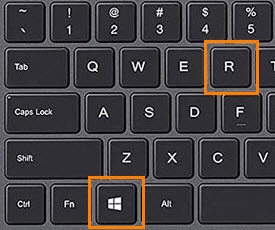
- Press Win+R to open the Run window, and input REGEDIT to open Registry Editor.

- Delete all the data under HKEY_CURRENT_USER\SOFTWARE\ZWSoft\ZWCAD\2024\en-US\Profiles\Default\UserInterfaceSettings\HatchDlg in Registry Editor. For other ZWCAD versions and languages please refer to the corresponding path.

- If the above cannot solve the issue, go back to the Registry Editor and delete HKEY_CURRENT_USER\SOFTWARE\ZWSoft\ZWCAD\2024\en-US. For other ZWCAD versions and languages please refer to the corresponding path.

- Execute the Hatch function again, the Registry key will be restored to the default value, and the Hatch dialog box will be displayed normally.
| CN Solution | ★中望CAD为什么使用填充功能不弹出填充对话框 |
|---|
★Why does the hatch dialog box not pop-up when using the hatch function:https://confluence.zwcad.com/pages/viewpage.action?pageId=130428544