
Issue:
The licensing rule of ZWCAD requires that the version of the authorization module on the server must be equal to or higher than that of the client in order to use the authorization normally on client side.
At the same time, there is a possibility of upgrading the licensing tool in the same annual version, so you need to know the way to query the licensing tool version in order to ensure that the server-side version is not lower than the client-side.
How to check the licensing tool version on both the server side and the client side?
Solution:
- Server-side softkey licensing tool version inquiry.
Open Lmtools, click Server Status, click Perform Status Enquiry button, and look at the information displayed in v11.*. * is the version number Also in the server installation directory, find the file FNP_Act_Installer.dll, right-click it, in [Properties - Details], you can find the version info in the File version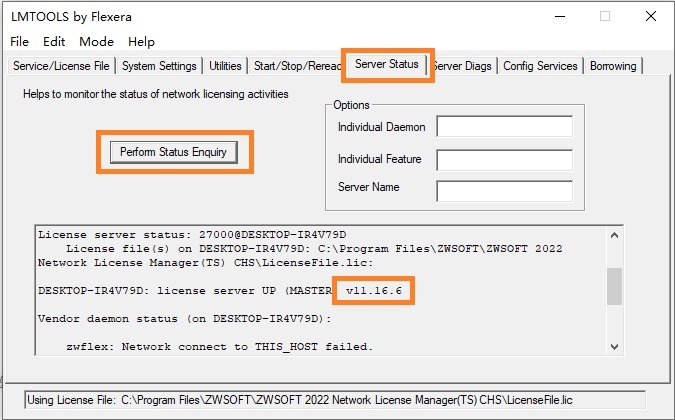
Also in the server installation file folder, find FNP_Act_Installer.dll and check in Properties - Details - File version
- On the client side, find the FNP_Act_Installer.dll file in the ZWCAD installation file folder, and check the Properties -> Details -> File version, the result is the same as the above image shown.
| CN Solution | ★中望CAD如何查看授权模块的版本 |
|---|
★How to check the ZWSOFT licensing tool version:https://confluence.zwcad.com/pages/viewpage.action?pageId=104541164